You use your phone for clients and for your family. You drive to jobs and to your cottage. The internet at home serves your work and your evening series. For tax purposes the rule is clear: only the business part of the expense belongs in your records. In practice it is a nuisance — remembering with every phone bill that you claim 80%, and cutting the amount by hand. Taxorio now handles it with a single setting.
Why expenses get reduced
The Income Tax Act recognises as a tax expense what you spent to earn, secure and maintain your income. When something also serves you privately, you claim only the proportional part — and you should be able to defend the ratio you chose. Typical cases:
| Expense | Common practice |
|---|---|
| Phone and internet | A ratio based on actual use, often 50–80% business |
| Fuel | According to the mileage log; anyone who claims the flat-rate travel expense instead (the reduced 4,000 CZK a month for a vehicle also used privately) does not claim fuel at all |
| Home office | A proportional share of energy and rent by the floor area used |
We went through the subject in detail in Phone, internet and software as expenses. This article is about automating the reduction once and for all.
The new setting: default business use by category
In Settings → Expense deductions you will find a new section called Default business use by category. It works simply:
- Add a category — Fuel, for example.
- Set the default percentage for business — say 80%. The app shows you straight away how much is left as private.
- Save. From that moment, every new expense in that category is pre-filled with an 80% claim.
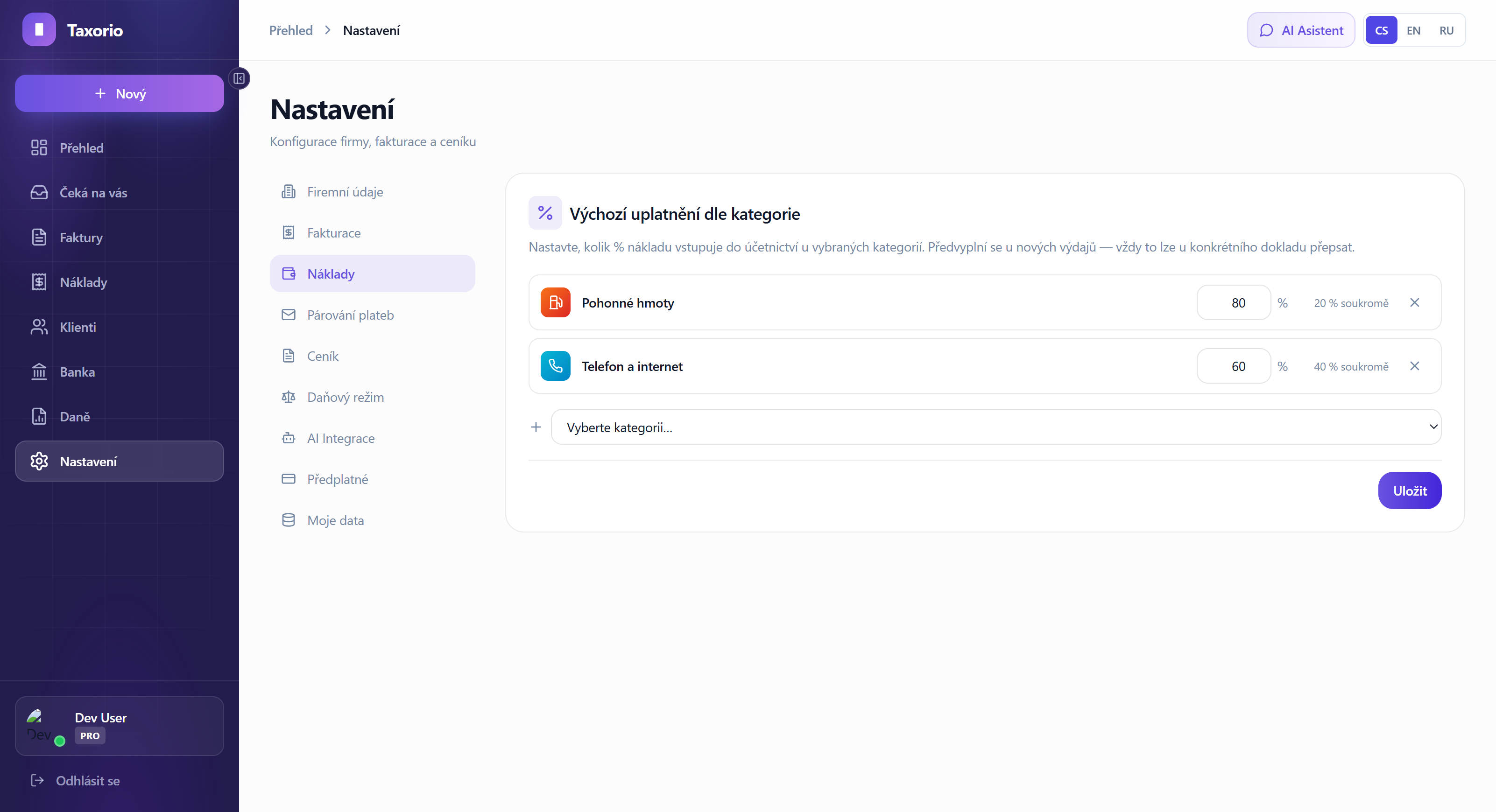
Categories you do not set are claimed at 100% as usual — you configure only the exceptions. And the default really is only a default: you can override it on a specific document at any time.
The best part: it works with the AI scan too
The point is that the default percentage applies wherever the expense is created:
- Entered by hand — pick the category in the form and the percentage fills itself in.
- AI scan and the document inbox — photograph a receipt from the petrol station, the AI files it under Fuel, and the expense is created with your 80% claim already applied. Not one extra click.
- ISDOC invoices — the same applies to electronic invoices.
Who benefits most
- Drivers — a car used for business and privately is the textbook case (and do keep your fuel records).
- Freelancers with a home office — phone, internet, energy: all of them reduced categories.
- Anyone who uses the AI scan — automation is only as good as its defaults. Now you can set them yourself.
Summary
Reducing expenses is a tax obligation that is easy to forget. In Taxorio you now set it once — a percentage for every category where you do not claim the full 100% — and the app pre-fills it on every new document, whether it comes from the form, the AI scan or an ISDOC invoice. All you do is watch for the exceptions.
Taxorio scope: Taxorio provides invoicing and income/expense records for Czech sole traders. It is not full accounting or personalised tax advice. For an unsupported or unusual case, verify the treatment with a Czech accountant or tax adviser before filing.